

Key Takeaways:
-
The Routica Explorer series combines a cellular modem, Wi-Fi router, GPS, and media server in one RV-ready device.
-
Explorer II offers dual physical SIM plus eSIM with manual carrier switching for flexible coverage across regions.
Spring is here, and that means it’s time to hit the road. But before you pull out of the driveway, there’s one thing most RV travelers get wrong: reliable RV internet setup. Campground Wi-Fi is notoriously slow, overcrowded, and unsecured. And a phone hotspot alone isn’t going to cut it when you need a stable connection for your entire rig.
If RV Wi-Fi has been a frustrating experience for you in the past, you’re not alone. Most RV travel setups are cobbled together with workarounds that fail at the worst moments. The good news? There’s a cleaner, smarter way to handle the internet on the road.
This guide walks you through everything you need to know to set up fast, secure, and dependable RV Wi-Fi before your first spring trip. And yes, we’ll show you the RV Wireless Gateway Router that makes it all possible.
Why Your RV Internet Setup Can’t Rely on Campground Wi-Fi
Here’s an uncomfortable truth about RV campgrounds: their shared Wi-Fi networks are built for light browsing, not for the demands of modern RV travel. Once you add dozens of RVs, all streaming, working, and video calling at once, speeds crater. Security is another issue, as open or poorly secured networks put your devices and personal data at real risk.
Your phone’s built-in hotspot sounds like a solution, but it introduces its own problems. You’re limited to one carrier; the signal varies by location, and every device on your trip has to connect separately. For a seamless RV Wi-Fi experience, a dedicated cellular router for RV use is the step change you need.
The smarter move is bringing your own RV cellular Gateway, a single device that handles your cellular connection, distributes Wi-Fi to all your devices, and gives you full control over your network.
That’s exactly what the Routica Explorer Wireless Gateway is built to do.
5 Reasons Your Spring RV Internet Setup Starts Here
1. Dual Physical SIM + eSIM: Stay Connected Where You Need
The Routica Explorer II supports dual physical SIM cards plus eSIM capability, giving you up to 10 different carrier configurations. You can store up to 8 eSIM profiles on the device, so you’re always ready to connect with the best available network wherever you travel.
Spring RV travel means crossing different coverage zones, from national parks where one carrier dominates to rural stretches where another is your only option. Instead of being stuck with weak bars all weekend, you manually switch to whichever carrier has the strongest signal with just a few taps in the app.
Picture arriving at a campground in the Smokies and finding your usual carrier barely has two bars. Switch to your backup SIM, signal restored, and you’re video calling the family back home without dropping a word.
2. Easy Wi-Fi Internet Sharing: Stop Reconfiguring Every Device at Every Campground
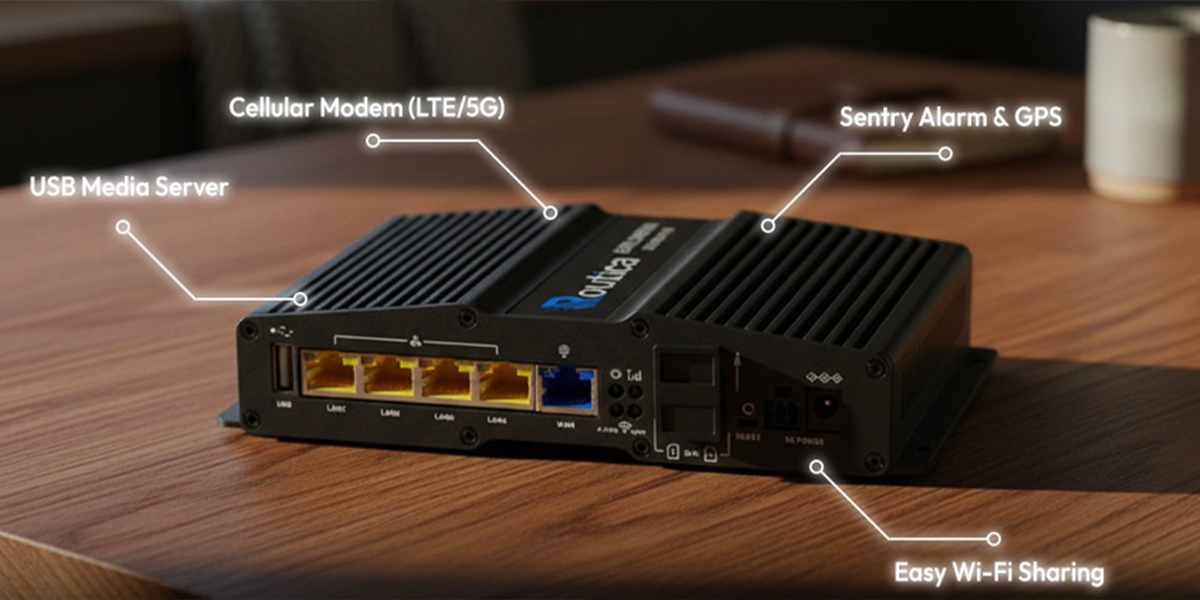
With Easy Wi-Fi Internet Sharing , you connect the Routica Explorer Gateway Router to the campground Wi-Fi once, and it shares that connection securely across your own private network. Every device on your trip, laptop, tablet, TV stick, phones, is online in seconds.
Return to the same campground later in the season, and the Routica Explorer Wireless Gateway Router reconnects automatically. No passwords to dig up, no setup to repeat. And because your devices are on your own network rather than the campground public one, your personal data stays protected the whole time.
3. USB Media Server: Movie Night Anywhere, Without Burning Through Your Data
Load your favorite movies, shows, and music onto a USB drive, and the Routica USB Media Server streams it to every device on your local network; zero cellular data required.
You’re parked at a remote spring campsite with no campground Wi-Fi in range. The kids want to watch something after a full day of hiking. Load your movies, shows, and music onto a USB drive before you leave home, plug it into your Routica Explorer Wireless Gateway, and everyone watches what they want on their own device. Think of it as your own private streaming library for the campsite. Your cellular data stays available for when it actually matters.
4. Trip Sharing and GPS Tracking: Keep Everyone in the Loop and Your RV Secure
Built-in GPS powers the Trip Sharing feature, so you can share real-time location updates and journey highlights with friends and family without texting your coordinates every hour. They see exactly where you are. You stay focused on the drive.

The same GPS powers the Alarm and Sentry feature, which monitors your RV and sends an alert if it moves unexpectedly while you’re away from camp. Whether you’re hiking a trail or grabbing groceries in town, you’ll know immediately if something is not right.
For spring trips where you’re often leaving your rig unattended at a campsite all day, that kind of peace of mind is genuinely hard to put a price on.
5. Third-Party VPN: Work Securely from Any Campground
Spring is peak season for RV travel that doubles as a workation.
If you’re handling client files, logging into company systems, or simply want to browse without leaving a trail on shared campground networks, VPN protection matters.
The Routica Explorer Wireless Gateway Router supports third-party VPN, so every device on your network is covered automatically without installing or activating a VPN app on each one individually.
Set it up once and it applies to everything: your laptop, your phone, your tablet, even your smart TV. Whether you’re parked at a crowded campground with dozens of strangers on the same Wi-Fi or working remotely from a quiet state park, your connection and your data stay private.
How to Do Your RV Internet Setup before You Leave
Setting up your RV internet setup with Routica Explorer Wireless Gateway Router takes minutes, not hours. Here’s the quick-start process:
-
Install the Routica app from the Google Play Store or Apple App Store.
-
Insert your SIM card(s) and power on your Routica Explorer.
-
Follow the Quick Setup Guide in the app to connect your devices.
-
Pre-configure the campground’s Wi-Fi credentials in your router before you arrive, if you have them. This way, you’ll connect automatically when you pull in.
-
Turn on GPS/GNSS tracking to record your trips and share your location with family or friends who want to follow along.
-
Enable Alarm and Sentry so your RV is monitored even when you’re away from camp.
Summing Up
Spring RV travel should be about open roads and new places, not fighting for a weak signal at a crowded campground. With the right RV Wireless Gateway Router, you get consistent RV Wi-Fi, smart failover, GPS tracking, and media streaming all from one device.
Whether you’re a weekend warrior heading out for your first spring trip or a full-timer logging miles year-round, the Routica Explorer Wireless Gateway is the mobile router for RV connectivity you need.
Don’t let slow internet ruin your adventure.
Ready to upgrade your RV internet setup? Here’s where to get started: